Sync and Index
The Sync and Index page controls which products are searchable and what product data VIBE uses.
The page has two tabs: Overview, where you check on your catalog and update it, and Configuration, where you choose searchable products and what VIBE knows about them.
The Overview tab
Section titled “The Overview tab”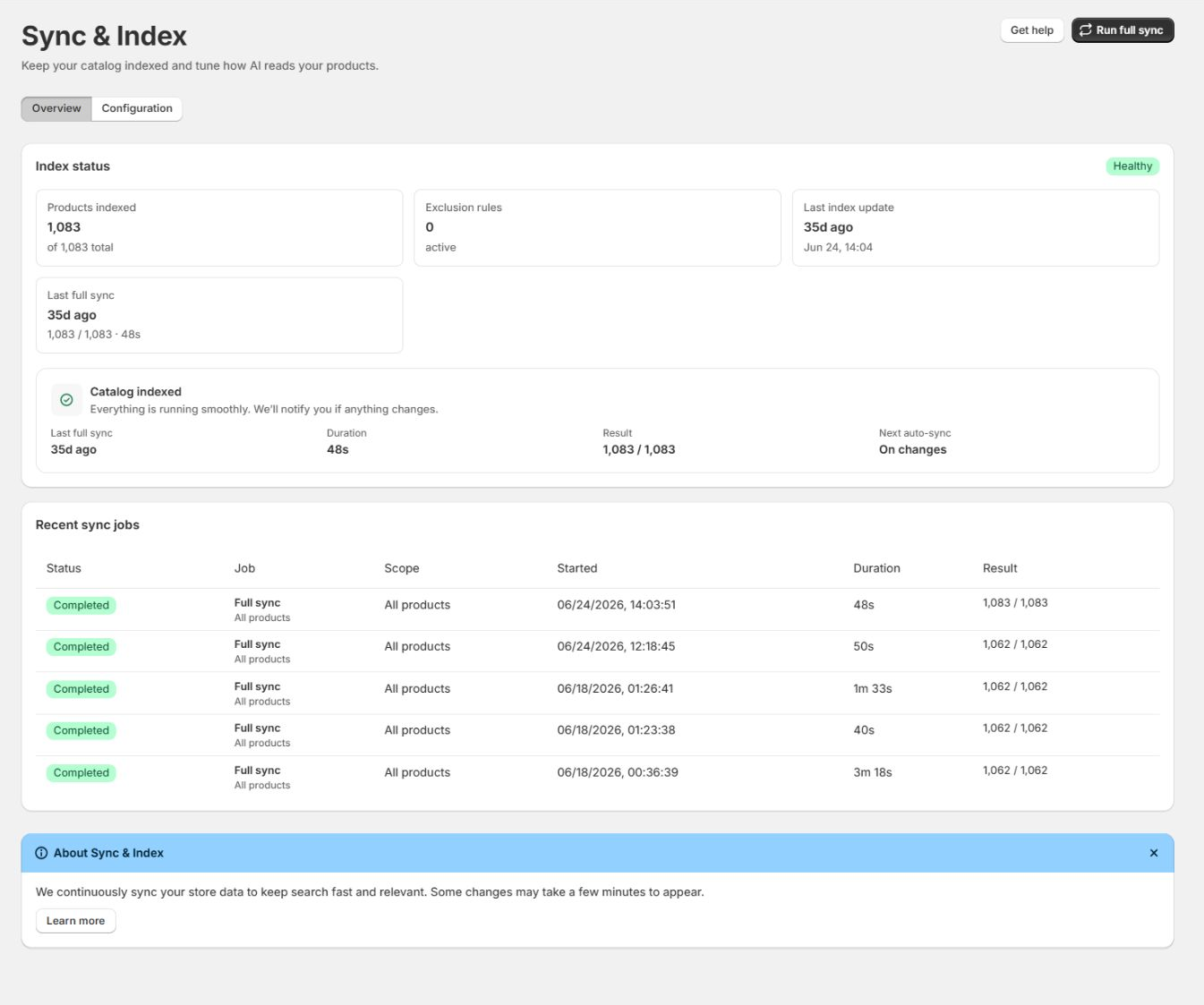
The Index status panel shows a Healthy badge when the catalog is ready. It includes:
- Products indexed is how many products are searchable, out of your total catalog. When these match, your whole catalog is in VIBE’s copy.
- Collections indexed is how many collections are in VIBE’s copy.
- Exclusion rules is how many active rules are hiding products from search. Zero means nothing is hidden.
- Last index update is when VIBE’s copy last changed.
- Last full sync is when you last rebuilt VIBE’s whole copy, with the result and how long it took.
- Next auto-sync shows when the next automatic update runs. On changes means VIBE updates its copy whenever you add, edit, or remove a product in Shopify.
The Recent full sync jobs table lists your update history.
Statuses include:
- Pending: the job is waiting for a worker.
- Running: VIBE is processing products, variants, or collections.
- Completed: every item VIBE could show in that run finished successfully.
- Partial: most items finished but some still need attention.
- Cancelled: a merchant stopped the job.
- Failed: the job could not complete.
Each row shows the Status, Job, Scope, when it Started, the Duration, and the Result.
During a live job, the page shows separate progress for products, variants, and collections when those areas are part of the run. Failed items are retried automatically up to the limit VIBE shows.
Update your whole catalog
Section titled “Update your whole catalog”VIBE updates its copy automatically when your Shopify catalog changes. Run a full refresh after a large catalog import, after changing what VIBE reads on the Configuration tab, or when results seem out of date.
- Select Run full sync in the top right to update VIBE’s whole copy of your catalog. VIBE processes the products it can show. You can keep working while it runs.
- While it is active, select Cancel sync only if you need to stop the work. Cancelling leaves your previous copy of the catalog available. Select Run full sync again when you are ready.
- If a run finishes as Partial, the primary action changes to Finish sync. Select it to process the remaining items without treating the completed portion as lost.
How to check it worked: the job’s status changes to Completed, and the product count on the Overview tab matches your catalog.
If something looks wrong: for a product that is still missing after the job completes, see A product is completely missing.
What VIBE can find
Section titled “What VIBE can find”VIBE finds the products shoppers should be able to find, and leaves out the rest. A product is left out of search when any of these is true:
- Its status is not Active (drafts and archived products are skipped).
- It is not published, or not published to the Online Store sales channel.
- It is hidden from search engines (the
seo.hiddensetting). - It matches one of your exclusion rules (see Hide an item below).
There is no product limit. VIBE includes your full catalog on every plan.
The Configuration tab
Section titled “The Configuration tab”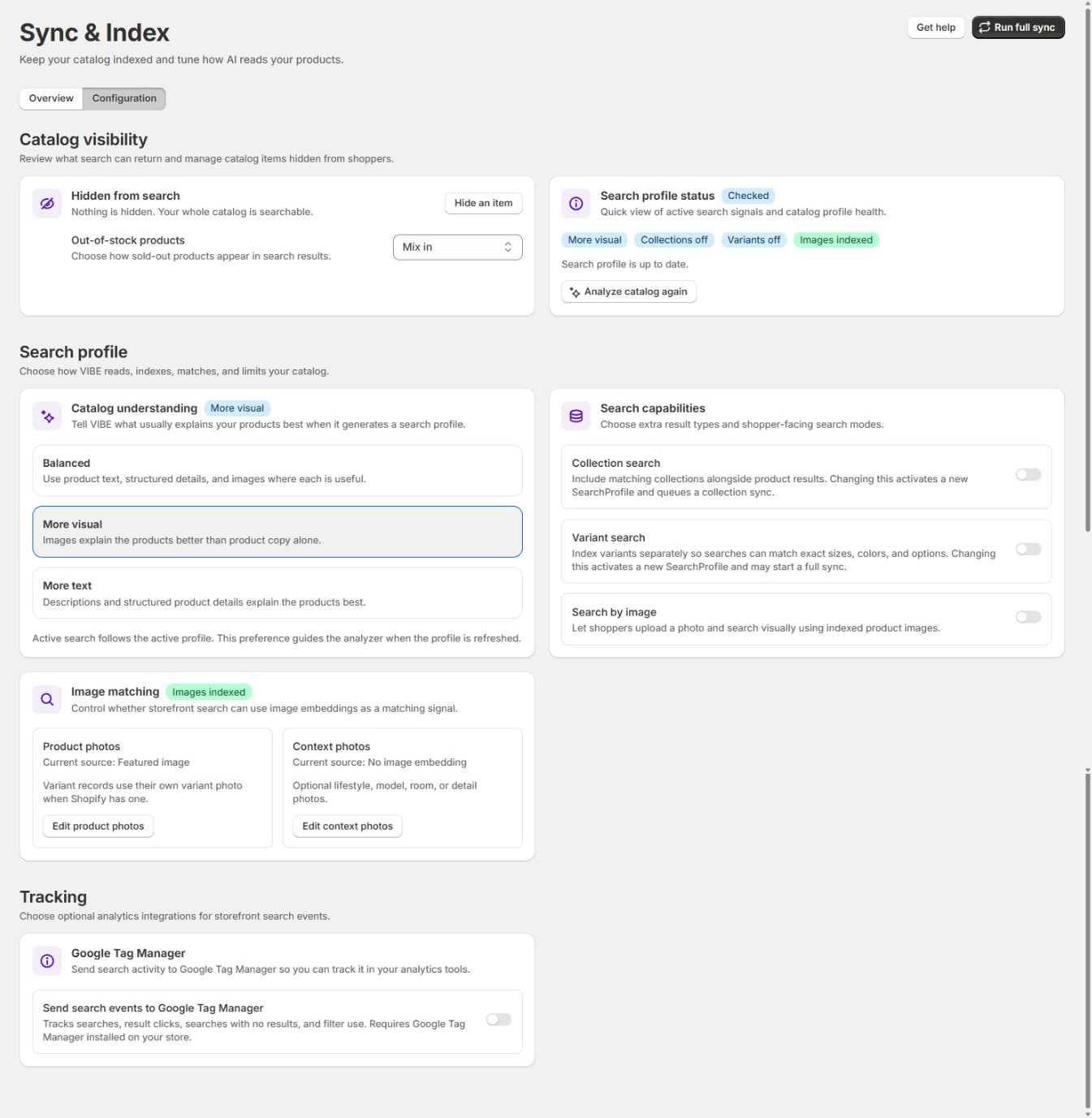
Catalog visibility
Section titled “Catalog visibility”Hidden from search controls which products and collections stay out of results. Select Hide an item to add an exclusion.
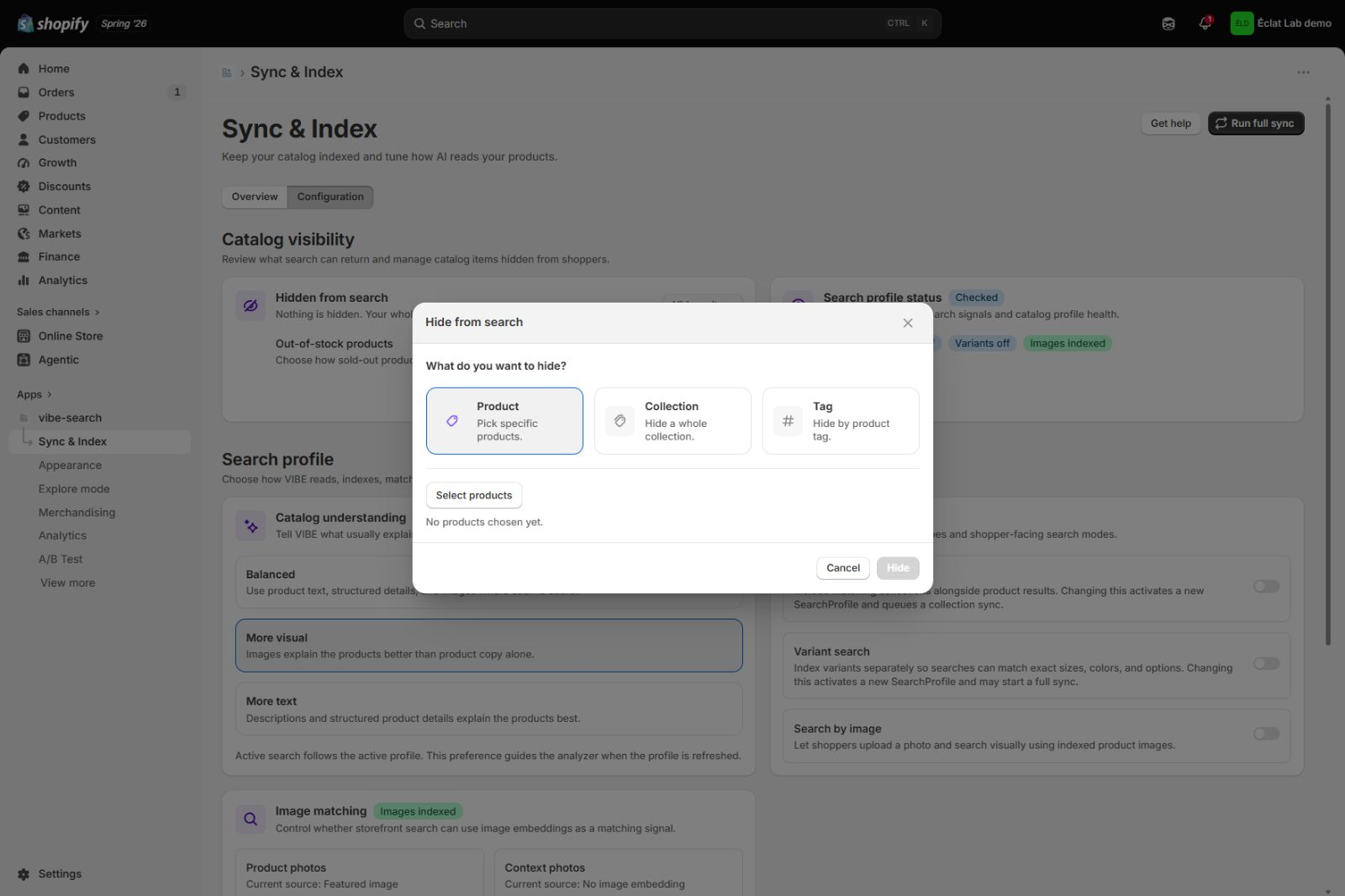
Choose what to hide:
- Product hides specific products you pick.
- Collection hides a whole collection at once.
- Tag hides every product carrying a tag.
Use exclusions for clearance, internal, placeholder, or other products that should not appear in search. Exclusions do not remove products from Shopify.
Out-of-stock products decides how sold-out products are ordered:
- Hide removes them from results.
- Show last puts them after in-stock products.
- Mix in ranks them normally with the rest of the catalog.
Search profile status
Section titled “Search profile status”This card shows the active catalog-understanding preference, collection and variant search status, and whether images are ready for image search. Select Analyze catalog again after a substantial change to the catalog or product presentation.
Search profile
Section titled “Search profile”Catalog understanding tells VIBE which signals usually explain your products best:
- Balanced combines product text, structured details, and images.
- More visual gives product imagery more importance.
- More text favors descriptions and structured product data.
Changing this preference guides the next catalog analysis.
Search capabilities controls optional result types and shopper features:
- Collection search includes matching collections beside products.
- Variant search keeps variants as separate searchable records so exact colors, sizes, and options can match.
- Search by image lets shoppers upload a photo and search against the product images VIBE has.
Some capability changes activate a new way of reading your products and may queue a catalog update.
Image matching
Section titled “Image matching”- Product photos chooses the primary product-image source used for matching.
- Context photos optionally adds lifestyle, model, room, or detail images as another visual signal.
Variants use their own image when Shopify provides one.
Tracking
Section titled “Tracking”Send search events to Google Tag Manager pushes searches, result clicks, no-result searches, and filter activity to your storefront’s data layer. Turn it on only when Google Tag Manager is already installed on the store.
Recipe: hide your clearance collection from search
Section titled “Recipe: hide your clearance collection from search”- Open the Configuration tab and select Hide an item.
- Choose Collection and select your clearance collection.
- Select Run full sync to apply the change immediately.
The products remain available by direct link but stop appearing in VIBE search. Use Tag to hide products carrying a tag such as discontinued.
How to check it worked: the collection’s products no longer appear in Search Preview or your storefront search.
Troubleshooting
Section titled “Troubleshooting”A product is missing from search. Why? VIBE excludes products that are not Active, not published to the Online Store, hidden from search engines, or matched by a Hide rule. Check those conditions, then select Run full sync. Search Preview shows whether VIBE has the product.
I changed a product in Shopify but search is out of date. VIBE updates its copy automatically a short time after you save in Shopify. Give it a moment, then hard refresh your storefront. If it still has not caught up, select Run full sync to rebuild from your current catalog.
An update job shows as Failed. Open the Recent full sync jobs table to see the result, then select Run full sync to try again. A failed job does not remove what was already in VIBE’s copy.
An update job shows as Partial. Review the failed count and select Finish sync. If the same products fail again, inspect those products in Shopify and include their identifiers in a support request.
I cancelled an update. Is live search empty? No. Cancelling does not intentionally remove the last usable copy. Search continues with your previous copy of the catalog until a later update replaces it.
If something looks wrong beyond what is covered here, see Diagnose search and storefront problems.