Go-live quality assurance
Use this checklist before the first VIBE launch, after publishing a new theme, after a major catalog or profile change, and before starting an A/B test.
Create a test record with owner, date, store, theme, language, market, browser, device, result, evidence, and follow-up issue.
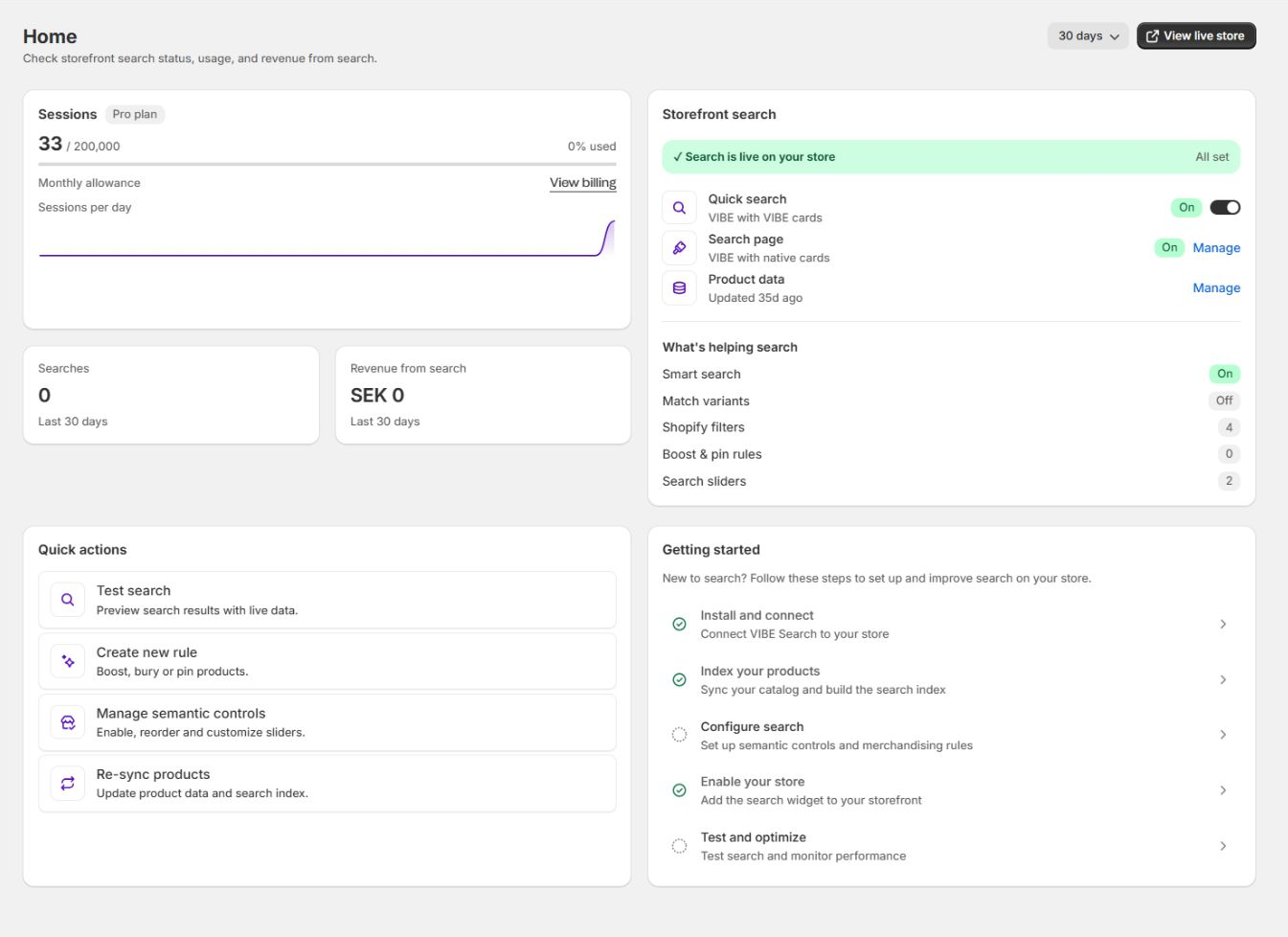
Begin QA with the admin health summary and finish incomplete setup work.
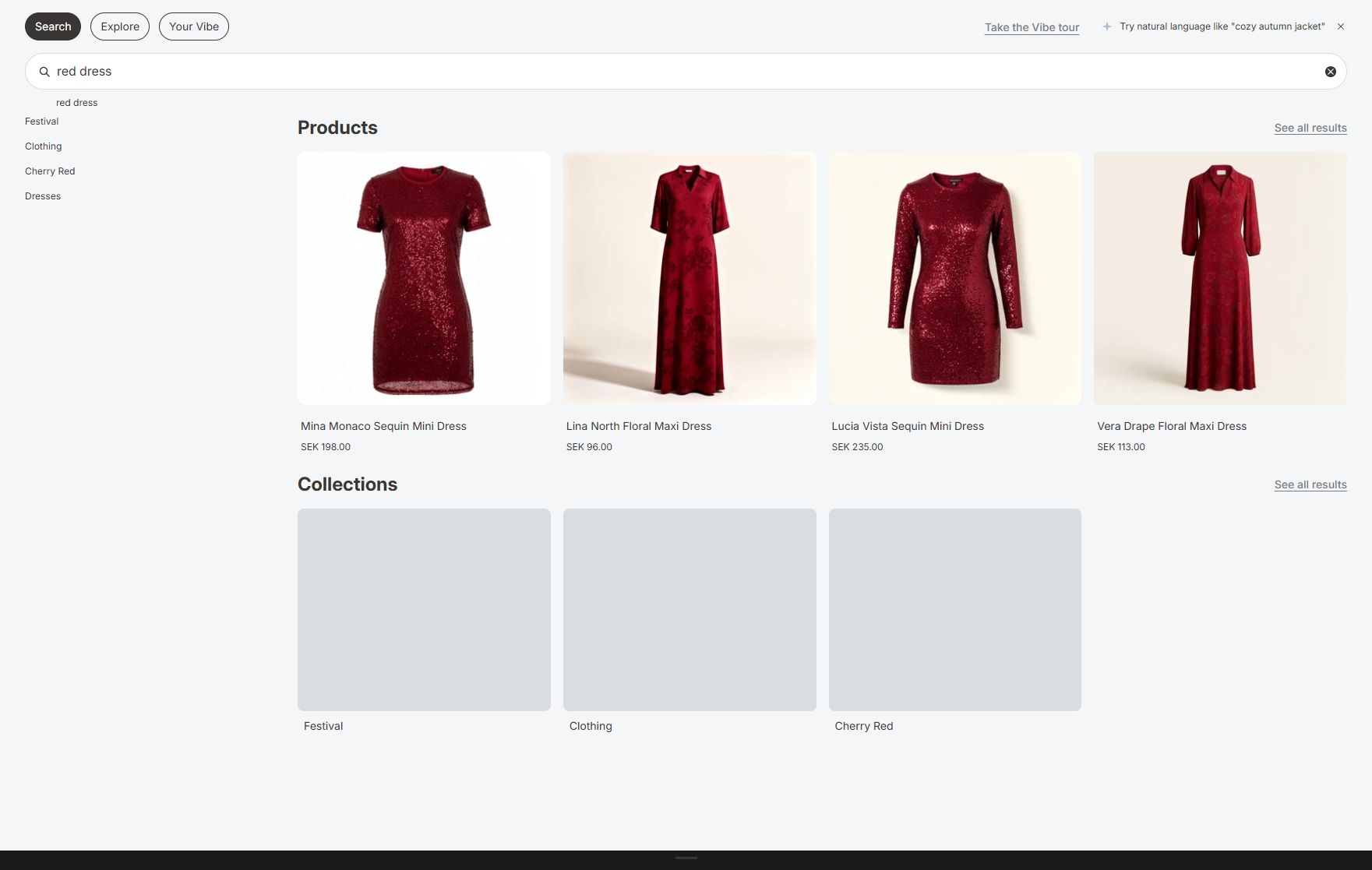
Preserve screenshots from the exact shopper paths included in sign-off.
Entry criteria
Section titled “Entry criteria”Do not start final storefront QA until:
- A Shopify-managed VIBE plan is active.
- The correct theme has been analyzed.
- The first full catalog update is complete or remaining failures are understood.
- Major decisions about how VIBE reads your products are final.
- Critical result rules are approved.
- The VIBE switch and Search Page block strategy is known.
- The launch language and market list is known.
Admin health
Section titled “Admin health”- Search on your store reports the intended state.
- Search style matches the launch decision.
- Product data is current.
- Shopper-visit allowance is appropriate for expected traffic.
- Quick actions open the correct pages.
- No setup checklist item is unexpectedly incomplete.
Sync and Index
Section titled “Sync and Index”- Products in VIBE’s copy match the catalog you expect to be searchable.
- Exclusion count matches the approved list.
- Latest job is Healthy or an accepted Partial state.
- No unexplained failed products remain.
- Out-of-stock behavior matches the commercial decision.
- Catalog understanding is correct.
- Collection search is correct.
- Variant search is correct and plan-enabled.
- Product and context image sources are correct.
- Image search is ready where visual features are used.
- GTM setting matches the analytics implementation.
Appearance
Section titled “Appearance”- Quick-search mode is intentional.
- Product-card mode is intentional.
- Product, collection, and suggestion limits are appropriate.
- Popular, pinned, article, and page groups are intentional.
- Search-page result count is appropriate.
- Recommended products and starting collections are approved.
- Every published language is loaded.
- Storefront wording is reviewed.
- VIBE colors and text meet contrast expectations.
- Font inheritance works.
- Grid layout and image ratios fit the catalog.
- The VIBE switch is verified.
- Instant search is ready.
- Search Page block is ready.
- Fast-loading cards are prepared where used.
- Storefront password is saved only if still required.
Explore mode
Section titled “Explore mode”- Master switch is intentional.
- Every active control has clear title and concepts.
- Control order is intentional.
- Active count is within the plan limit.
- Similar and Taste actions match the launch scope.
- Shopify filters are refreshed and enabled intentionally.
- Starting collections are current and ordered.
Merchandising
Section titled “Merchandising”- Every active rule has an owner and business reason.
- Triggers are scoped.
- Targets are correct.
- Pin positions are valid.
- Redirect destinations work.
- Synonyms are equivalent terms.
- Campaign schedules and timezone expectations are checked.
- Priority is reviewed for overlapping rules.
- Obsolete test rules are inactive or deleted.
- Saved rule count is within the plan limit.
Analytics and A/B
Section titled “Analytics and A/B”- Real storefront test activity appears after processing.
- Search Preview activity does not appear as normal storefront usage.
- GTM events are verified if enabled.
- Requirements for sales VIBE helped create are understood.
- No A/B test is running unintentionally.
- A planned test starts only after launch stability.
Quick-search test matrix
Section titled “Quick-search test matrix”Test every theme search icon, input, drawer, sticky header, desktop header, and mobile header.
Empty state
Section titled “Empty state”- Search opens once.
- Focus moves to the input.
- Close and Escape work.
- Background scrolling is controlled.
- Pinned searches are in order.
- Popular searches appear only when enabled.
- Starting discovery content is correct.
- Explore and Your Vibe tabs appear only when intended.
Typing
Section titled “Typing”- One-character and short-prefix behavior is sensible.
- Suggestions update without flicker.
- Product, collection, article, and page groups respect configured limits.
- No duplicate native and VIBE panels appear.
- Loading and empty states are readable.
- Keyboard navigation and Enter work.
- Touch targets work on mobile.
Result cards
Section titled “Result cards”- Image loads and uses the intended ratio.
- Title, vendor, price, sale price, and availability are correct.
- Long text does not break layout.
- Product link is correct.
- Variant context is correct where applicable.
- Similar and Taste actions appear only when enabled.
- Theme cards preserve required theme behavior.
See all results
Section titled “See all results”- Opens the correct
/searchURL. - Preserves the query.
- Does not duplicate or lose the result state.
Full search-page test matrix
Section titled “Full search-page test matrix”Direct navigation
Section titled “Direct navigation”/searchloads without a query.- Recommended products appear only when enabled.
- Starting collections are correct.
- Pinned and popular searches are correct.
Query state
Section titled “Query state”- Direct
/search?q=<query>works. - Refresh preserves the query.
- Browser Back and Forward work.
- Product count and result order are sensible.
- Product, collection, article, and page groups are correct.
Sorting
Section titled “Sorting”- Every offered sort choice changes order correctly.
- Sort survives expected URL navigation.
- Reset returns to the intended default.
Filters
Section titled “Filters”- Desktop filters open and apply.
- Mobile filter drawer opens, applies, and closes.
- Counts and selected values are readable.
- Multiple filters combine correctly.
- Clear one and clear all work.
- Availability, price, option, type, and other configured filters use correct values.
Pagination or load more
Section titled “Pagination or load more”- The next result set loads once.
- Existing results remain.
- No duplicates appear.
- End state is clear.
- Browser and URL behavior match the design.
Search relevance benchmark
Section titled “Search relevance benchmark”Choose at least:
- Five exact product names.
- Five broad categories.
- Five natural-language intents.
- Five common synonyms.
- Five variant searches.
- Three collection names.
- Three common misspellings.
- Three queries that should redirect.
- Three queries that should return no products.
For each, record:
- Expected top results.
- Preview top results.
- Storefront top results.
- Active filters, controls, and rules.
- Pass, accepted difference, or defect.
Explore and Smart Filters
Section titled “Explore and Smart Filters”- Explore opens from every intended surface.
- Default controls start neutral.
- Each slider changes results at both ends.
- Each toggle produces distinct results.
- Each single control has an observable effect.
- Starting collections scope results correctly.
- Exact filters combine with controls.
- Sorting works after control changes.
- Reset clears controls, collection, filters, and sort as intended.
- Tour can be completed and dismissed.
- No-control and no-result states are useful.
Visual discovery and Your Vibe
Section titled “Visual discovery and Your Vibe”Similar
Section titled “Similar”- Visible only on a plan and setting that includes it.
- Seed product has an image in VIBE’s copy.
- Results are visually coherent.
- Back navigation works.
Taste and favorites
Section titled “Taste and favorites”- Star adds and removes a product.
- Saved state updates in every open VIBE surface.
- Second tab receives the change where supported.
- Favorites survive refresh.
- Clearing site storage removes them.
- Private browsing and another device do not incorrectly inherit them.
Your Vibe
Section titled “Your Vibe”- Empty state explains how to begin.
- Saved products appear in order.
- Recommendation boards load.
- Based-on products are correct.
- Show more and All Favorites work.
- Back navigation and URL state work.
Image upload
Section titled “Image upload”- Camera action appears on intended surfaces.
- Supported JPG and PNG files work.
- Invalid type and oversized file show a safe error.
- Results match the image intent.
- Mobile photo selection works.
Languages and markets
Section titled “Languages and markets”For every published launch language:
- Search placeholder.
- Tabs and buttons.
- Products, collections, articles, and pages.
- Sorting and filters.
- Explore controls and states.
- No-results content.
- Similar, Taste, Your Vibe, and favorites.
- Tour content.
- Currency and product URLs.
- Localized product data.
Test the actual storefront locale and market, not only the admin translation selector.
Accessibility and resilience
Section titled “Accessibility and resilience”- All actions are reachable by keyboard.
- Focus is visible.
- Modal and overlay focus returns to the trigger.
- Escape closes appropriate surfaces.
- Labels and accessible names are meaningful.
- Text and controls meet contrast requirements.
- Zoom at 200 percent remains usable.
- Mobile orientation change does not trap the interface.
- Slow network shows loading state.
- API failure shows a safe fallback.
- No-results state offers a useful next action.
- VIBE cards remain available as a fallback when theme cards are not ready.
Analytics validation
Section titled “Analytics validation”Using a non-production or clearly identified test visit where possible:
- Open the storefront.
- Run a successful search.
- Run a no-result search.
- Apply a filter.
- Adjust a control.
- Click a product.
- Add the product to cart.
- Confirm GTM events if enabled.
- Confirm admin activity after normal processing.
- Keep test orders and production reporting clearly separated.
Launch decision
Section titled “Launch decision”Launch only when:
- No critical shopper flow is broken.
- All expected catalog groups are searchable.
- Known relevance differences are accepted or assigned.
- Theme and VIBE card fallbacks are understood.
- Mobile and language checks pass.
- Analytics and support ownership are assigned.
- Rollback actions are documented.
If something looks wrong: find the matching symptom in Diagnose search and storefront problems before you launch.
First 48 hours
Section titled “First 48 hours”- Check catalog health at launch.
- Monitor no-result and high-volume queries.
- Test top campaign searches.
- Review errors and system status.
- Confirm mobile and major languages.
- Record each hotfix and re-test its exact scope.
Avoid broad profile changes in the first 48 hours unless a critical issue exists.